Straight from the plugin listing
Every screen, exactly as it ships.
The eight screenshots and captions below are the same ones the plugin's WordPress.org directory listing uses, unretouched. What you see here is what activates on your site.
Your site is in WordPress, so the place to measure your AI visibility should be too. The free plugin handles the tag, the analytics and the opportunities without a single line of code. Upgrade on any paid plan to close the loop: llemmy tells you what to write, you draft it in WordPress from real data, and you track whether it actually moved AI visibility. Install once, paste a key, pick a project.
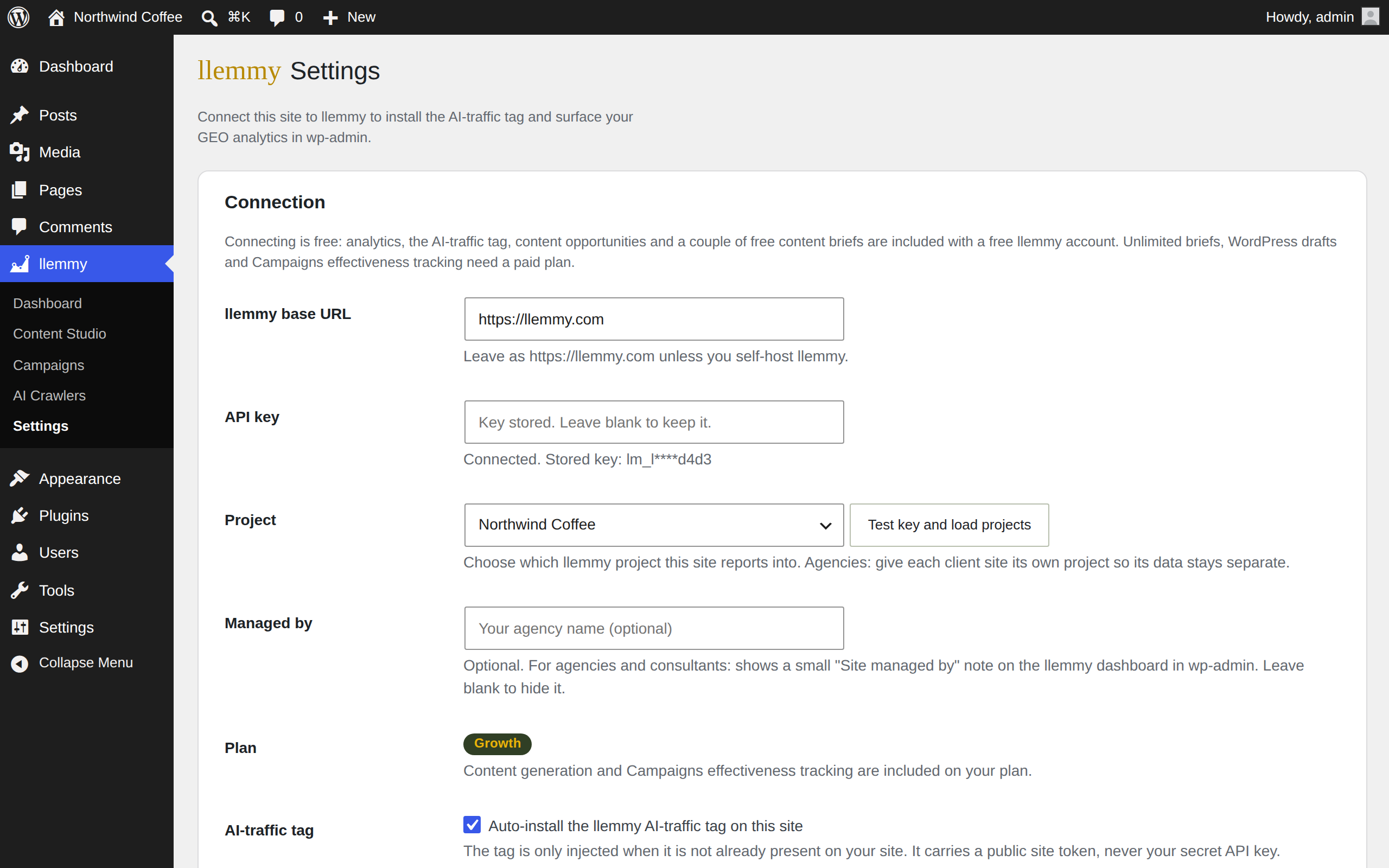
Paste a llemmy API key, pick the project this site reports into, save. The plugin registers the site and starts surfacing data.
The AI-traffic tag installs itself in your site head, and only when one is not already present. No copy-paste, no theme edits.
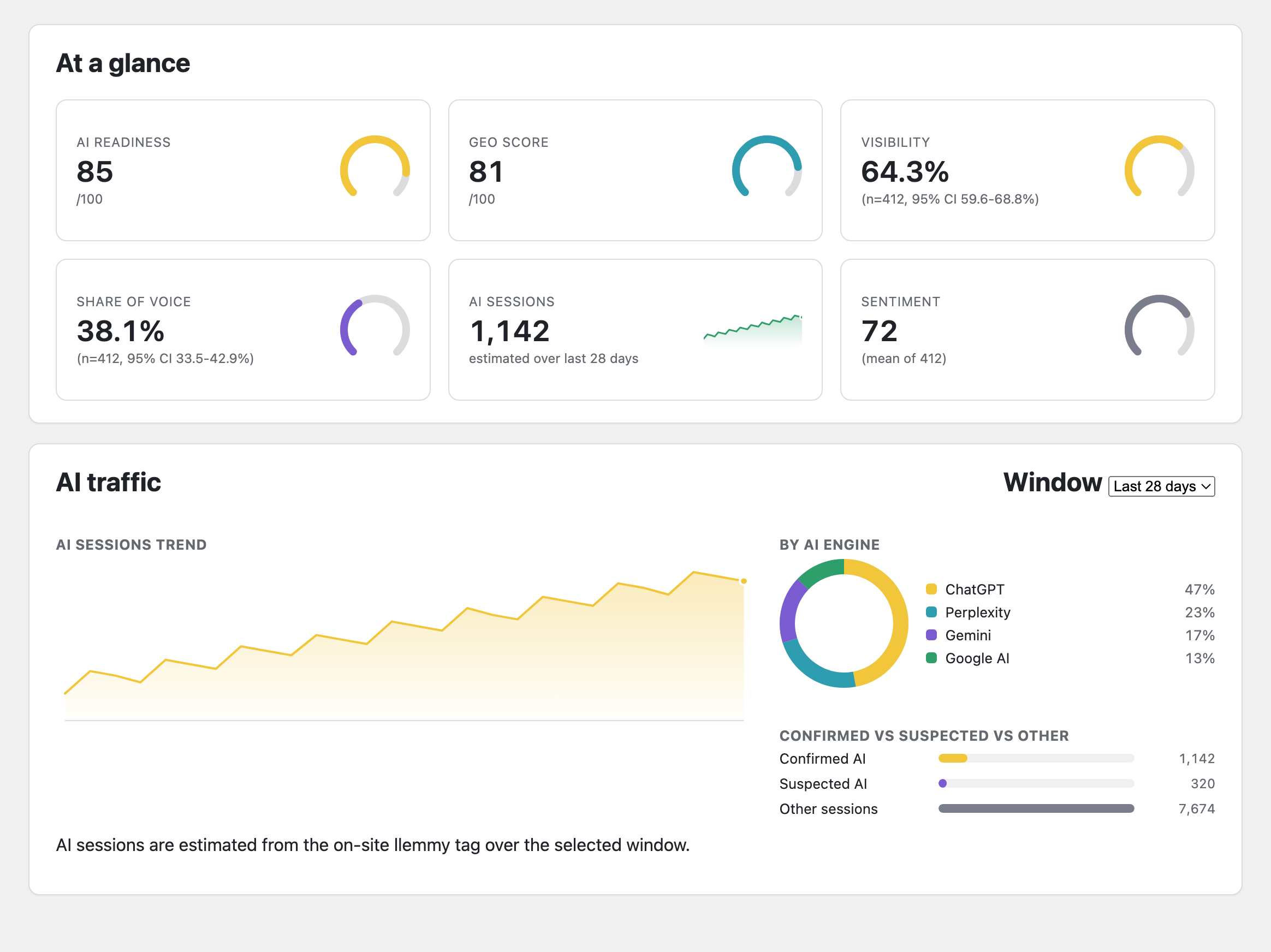
Visibility, share of voice and citation rate each carry their sample size and a 95% confidence interval, so you know how solid a number is.
Flip one switch and llemmy adds the AI-traffic tag to your site head for you. Before it does, it scans your home page for an existing tag, so you never load two. The tag carries only a public site token; your secret API key never leaves the server.
A dedicated llemmy screen in your WordPress admin shows your GEO snapshot, AI-referral traffic broken out by engine, and the pages and domains AI cites most, all pulled through the llemmy public API on the server. Nothing is fabricated: metrics read "not enough data yet" until llemmy has seen enough answers.
| Engine | Sessions | Events |
|---|---|---|
| ChatGPT | 612 | 1,940 |
| Perplexity | 331 | 1,012 |
| Gemini | 198 | 577 |
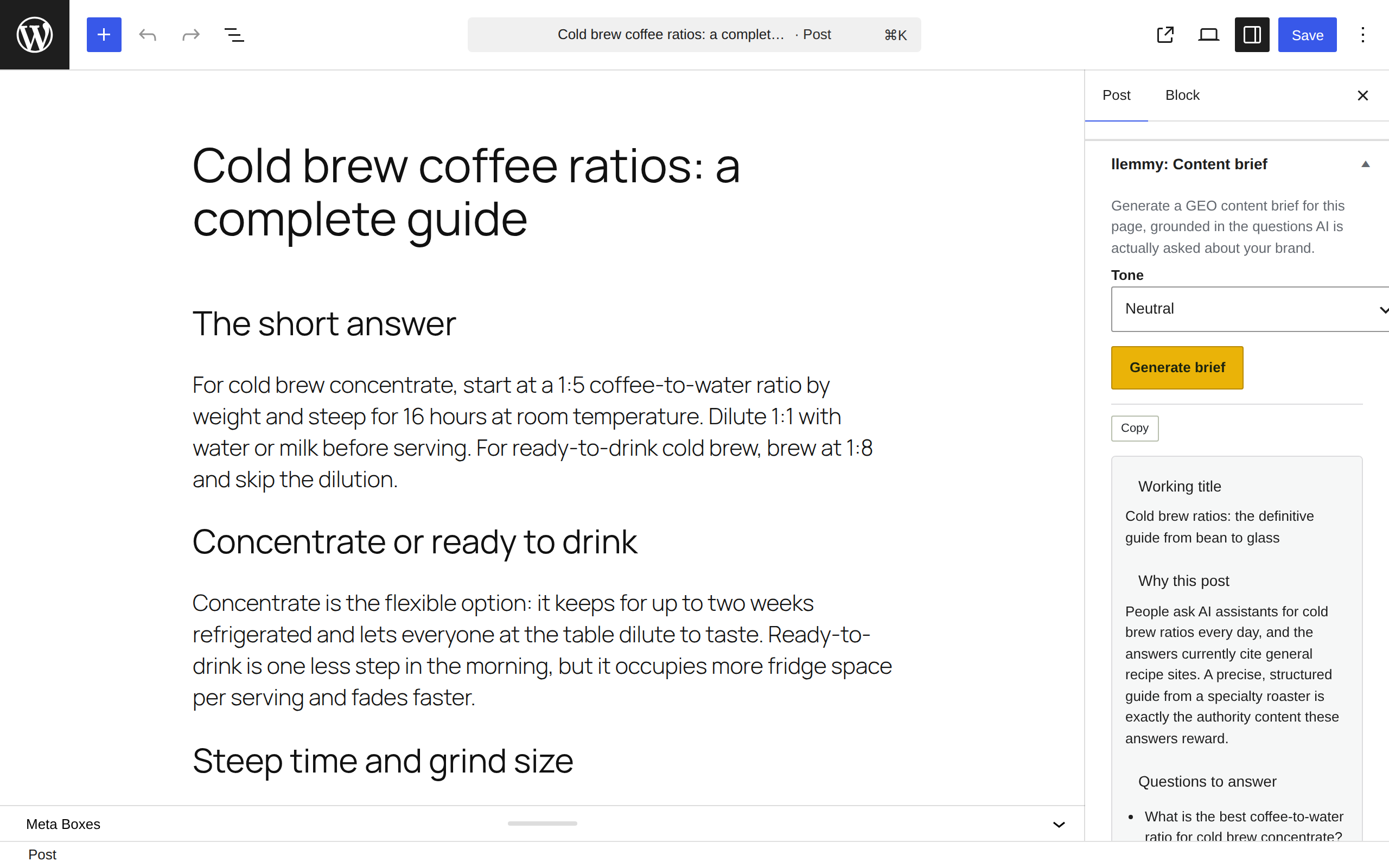
Open any post or page and the "llemmy: Content brief" box generates a GEO scaffold grounded in the questions AI is actually asked about your brand and the gaps in what it cites. Pick a tone, click generate, and copy the brief into your draft. It is display and copy only: llemmy never edits or publishes your content on its own.
The plugin is now an extension of llemmy Content Studio and Campaigns. It closes the loop right inside wp-admin: llemmy shows you what to write, you draft it in WordPress from real data, and you measure whether it moved AI visibility.
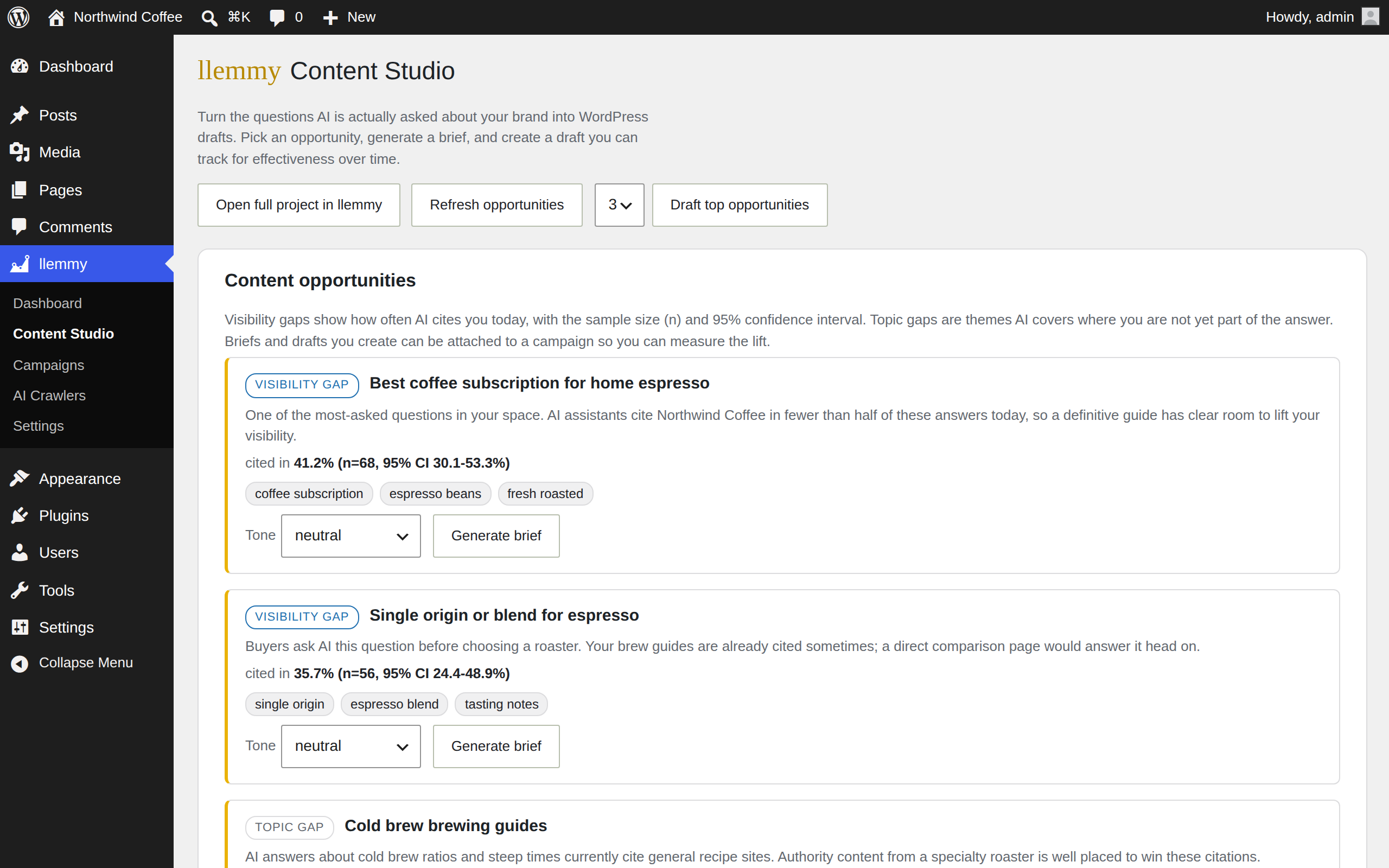
A Content Studio screen lists your writing opportunities: visibility gaps where AI does not cite you, and topic clusters your space leans on. Each is grounded in your own data, and gaps carry their sample size and a 95% CI.
One click, or a batch, turns an opportunity into a GEO brief and then a WordPress draft. Content lands as a draft, ready for you to edit and publish. llemmy never publishes on its own.
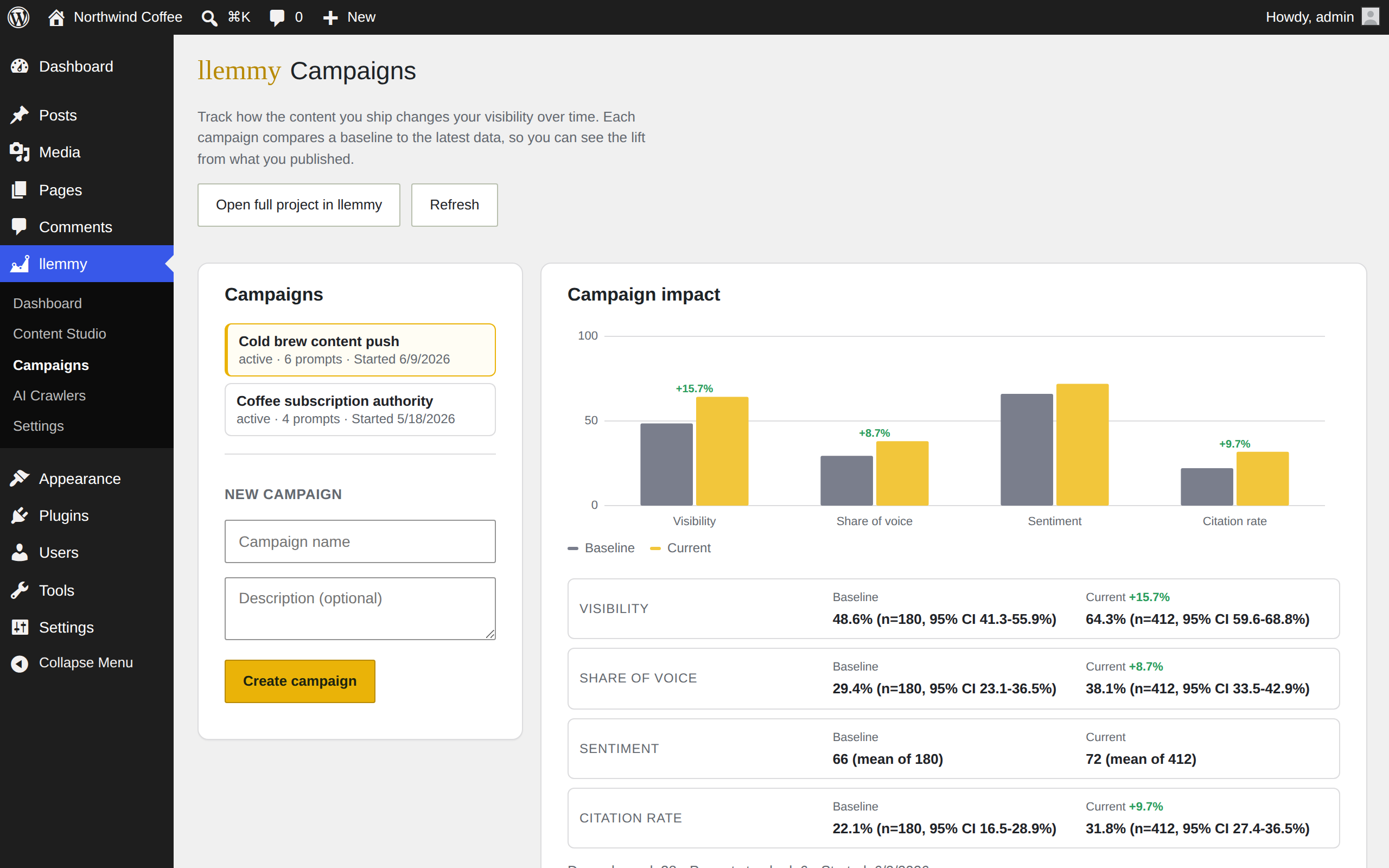
Attach the drafted content's prompt to a llemmy Campaign and watch baseline to current lift, in wp-admin. When you publish, a "content published" marker drops on the campaign timeline.
| Topic AI is asked about | Your visibility | |
|---|---|---|
| best pour-over coffee makers | 6% (n=214, 95% CI 3-10%) | Draft in WordPress |
| how to store whole-bean coffee | 11% (n=168, 95% CI 7-17%) | Draft in WordPress |
| decaf vs regular caffeine content | 18% (n=141, 95% CI 12-25%) | Draft in WordPress |
Pick a visibility gap or a topic cluster and the plugin drafts a GEO brief, then creates a WordPress post from it. Do one, or batch several at once. Every piece lands in your Drafts, so you keep the final say on wording and timing.
Measuring your visibility is half the job. The plugin also handles the on-site readiness work AI engines respond to, straight from your WordPress settings. Every toggle is individually controlled in settings, and nothing publishes or edits files on its own.
Organization and Article JSON-LD, with datePublished and dateModified, on every post. When your SEO plugin already outputs schema, llemmy steps aside automatically so nothing doubles up.
robots.txt rules that explicitly allow GPTBot, ClaudeBot, PerplexityBot, Google-Extended and friends, applied through WordPress without touching files on disk.
A machine-readable map of your key pages and recent posts, served at /llms.txt and refreshed as you publish, so AI engines have a clean guide to your best content.
Your posts ranked oldest-first from real modified dates, with fresh, aging and stale flags and a refresh checklist. Citation studies skew heavily toward recently updated content, so your oldest pages are where a refresh matters most.
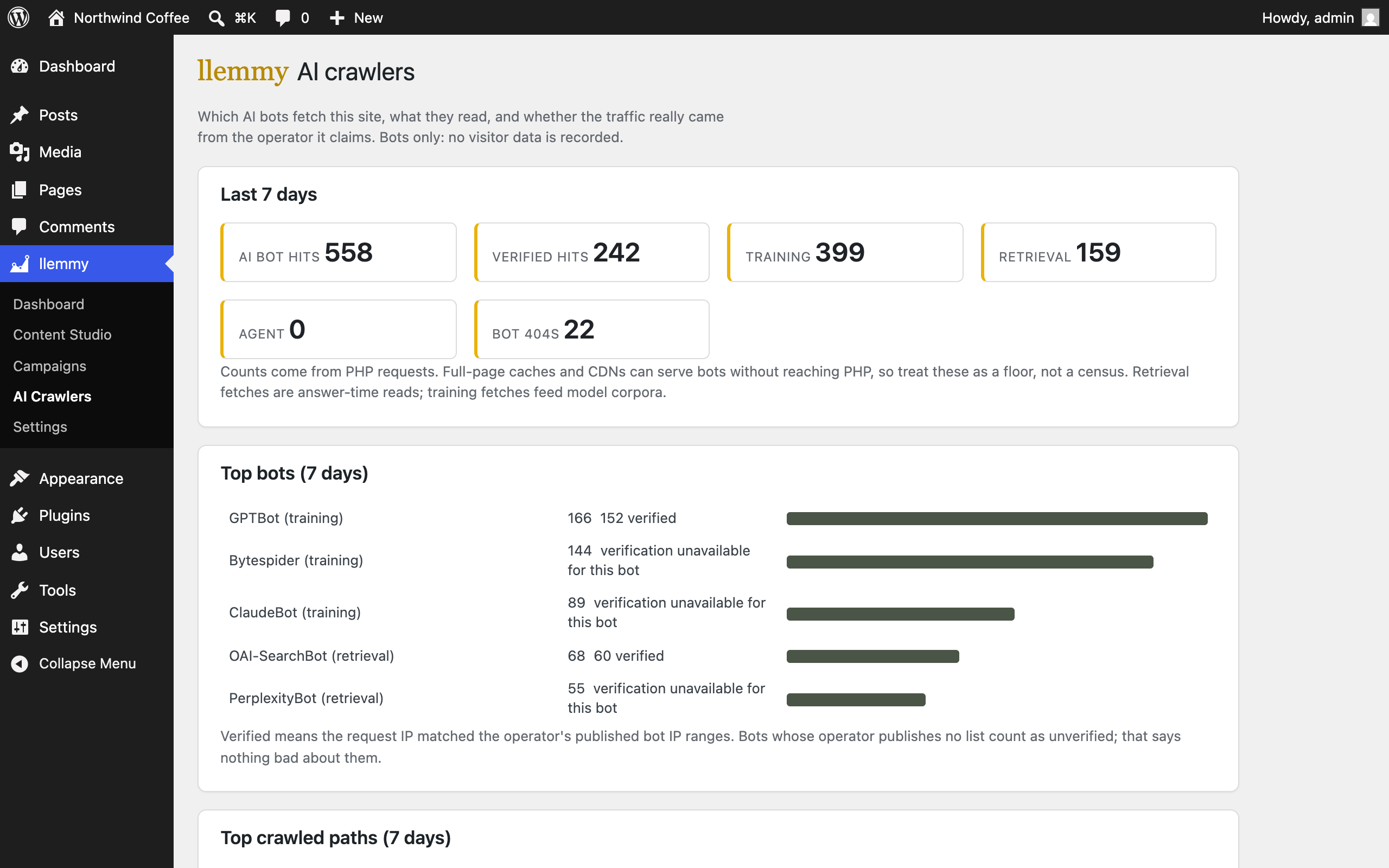
Before an AI answer cites you, a bot crawled and retrieved you. Because WordPress runs server-side, the plugin sees those bots directly, with no server logs, no CDN access and no extra setup. It records bots only and stores no visitor data.
GPTBot building model knowledge is a different signal from OAI-SearchBot or PerplexityBot fetching a page seconds before an answer. The plugin classifies both, plus the 404s you are serving AI bots. A 7-day local summary is free on every plan.
Any paid plan adds history in the llemmy app, bot verification against the providers' published IP ranges, most-crawled pages, and the crawl-to-citation view: how many days after a bot first fetches a page an AI answer first cites it. Counts are honest: server-side requests are a floor, and we say so.
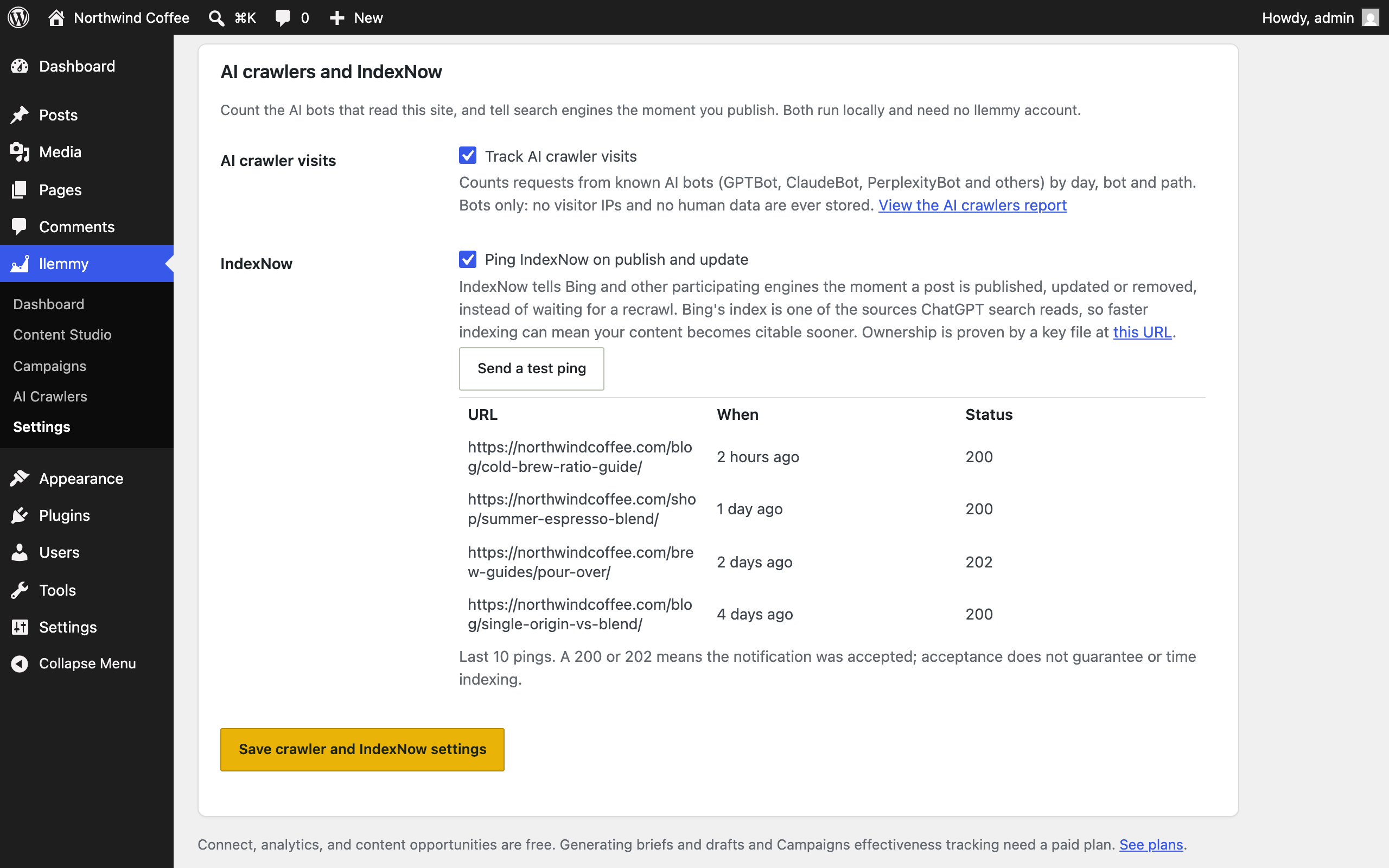
Bing's index feeds ChatGPT search. The plugin pings IndexNow the moment you publish or update, so fresh content reaches the retrieval pipelines faster. No llemmy account required.
llemmy registers its GEO data and actions as first-class WordPress abilities, using the native Abilities API that arrived in WordPress 6.9. That makes them available as Model Context Protocol tools, so the WordPress editor's own assistant and outside clients like Claude, Cursor and Copilot can read your AI visibility and act on it in plain language. On WordPress below 6.9 it stays completely inert, so nothing changes for older sites.
"What is my AI visibility? Where are my citation gaps? Which pages get cited, and which bots crawled me this week?" The read tools answer from your live llemmy data, and every proportion keeps its sample size and 95% confidence interval, so an agent cannot turn a thin number into a confident one.
"Draft a brief for this gap. Start a campaign to track it." The action tools turn an opportunity into a GEO-optimized WordPress draft, or open a campaign to measure the lift. They write drafts only, and never publish or edit a live page on their own.
Because the tools are built on the WordPress Abilities API rather than a bespoke endpoint, they follow WordPress's own permission model: read tools require manage_options, write tools require edit_posts plus your plan. Most WordPress analytics plugins ship a dashboard and stop there. This one is something an agent can actually use, safely.
For agencies, the plugin is the fastest way to get AI visibility reporting live across a portfolio. One .zip, dropped onto each client's WordPress, each pointed at its own llemmy project. Tag, analytics and briefs, everywhere you manage.
The plugin installs like any other. Upload it in wp-admin, activate, connect. No developer needed, no theme edits.
Point each site at its own llemmy project so every client's tag, analytics and briefs stay cleanly separated.
The secret API key is stored server-side, encrypted at rest when the server supports it, and never appears in page source or JavaScript.
Every number you show a client carries its sample size and confidence interval, so the reporting holds up under scrutiny. More for agencies →
A GEO tool only earns a place in wp-admin if it respects the site it runs on. llemmy is built to WordPress standards, top to bottom, so it is safe to trust on production and on client work.
Your secret key is encrypted at rest and lives server-side, never in page source. Every action is nonce-checked and capability-gated, and every database read uses prepared statements.
The crawler telemetry counts AI bots and nothing else: no visitor IPs, no cookies, no human browsing data, aggregate rows only. What syncs to llemmy is per-day, per-bot counts, and the free view stays local to your site.
Network-activate once and every subsite gets its own connection, project and tag. A network admin overview shows each site's status and headline visibility, with sample size and CI, in one place.
It detects Yoast, Rank Math, All in One SEO and SEOPress and steps aside when they already emit schema, and it only adds robots.txt or llms.txt rules when no physical file exists. No collisions, no surprises.
Every string is internationalized with a proper text domain and languages path, so the plugin is ready to localize for any WordPress community.
Focused code with no jQuery bloat, and everything is a toggle: the tag, the badge, crawler tracking, IndexNow and each readiness signal turn on and off from settings. Deactivate and it leaves cleanly.
The plugin is free and useful on its own: measure your AI visibility from inside WordPress, with confidence intervals not vanity numbers. The optional "AI visibility by llemmy" footer badge is off by default on every plan; it appears only if you choose to show it. Presence is a rate with its sample size and 95% confidence interval, measured over the official model APIs and Google AI Overviews read off the SERP; a confidence interval tames sampling noise but does not erase the biases we name in our methodology. Content drafted from an opportunity lands as a WordPress draft, never published on its own.
The eight screenshots and captions below are the same ones the plugin's WordPress.org directory listing uses, unretouched. What you see here is what activates on your site.
Grab the .zip and install it like any WordPress plugin. Activate it, click Connect to llemmy, and you are measuring your AI visibility: no API keys to copy, no snippets to paste. Before you even connect, the dashboard scores your AI readiness with one-click fixes. Any paid plan adds generating drafts and Campaigns tracking.
Attach a drafted post's prompt to a campaign and track baseline to current lift, with n and a 95% CI.
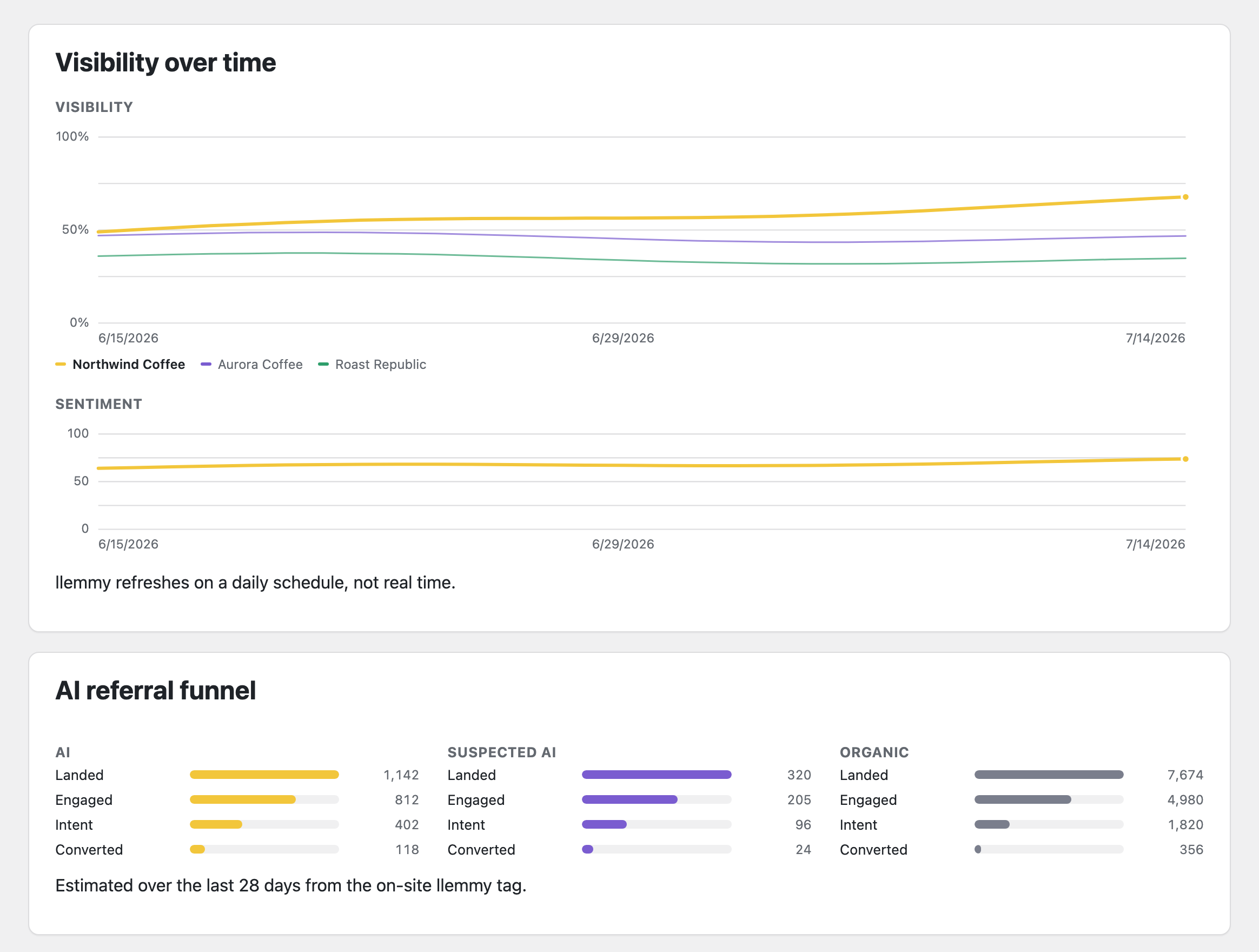
The AI-referral attribution the plugin's tag feeds, by engine and landing page.
The visibility gaps Content Studio turns into writing opportunities, across 6 AI engines.
Free plugin, free account. Connect in under two minutes, and see your AI visibility from inside WordPress.